Kinnetly review: a visual personal CRM for mapping your network
A review of Kinnetly, a visual personal CRM that helps you map and manage your professional network with interactive relationship maps and follow-up reminders.
4 min readAI-assisted, reviewed by our editors
What is Kinnetly?
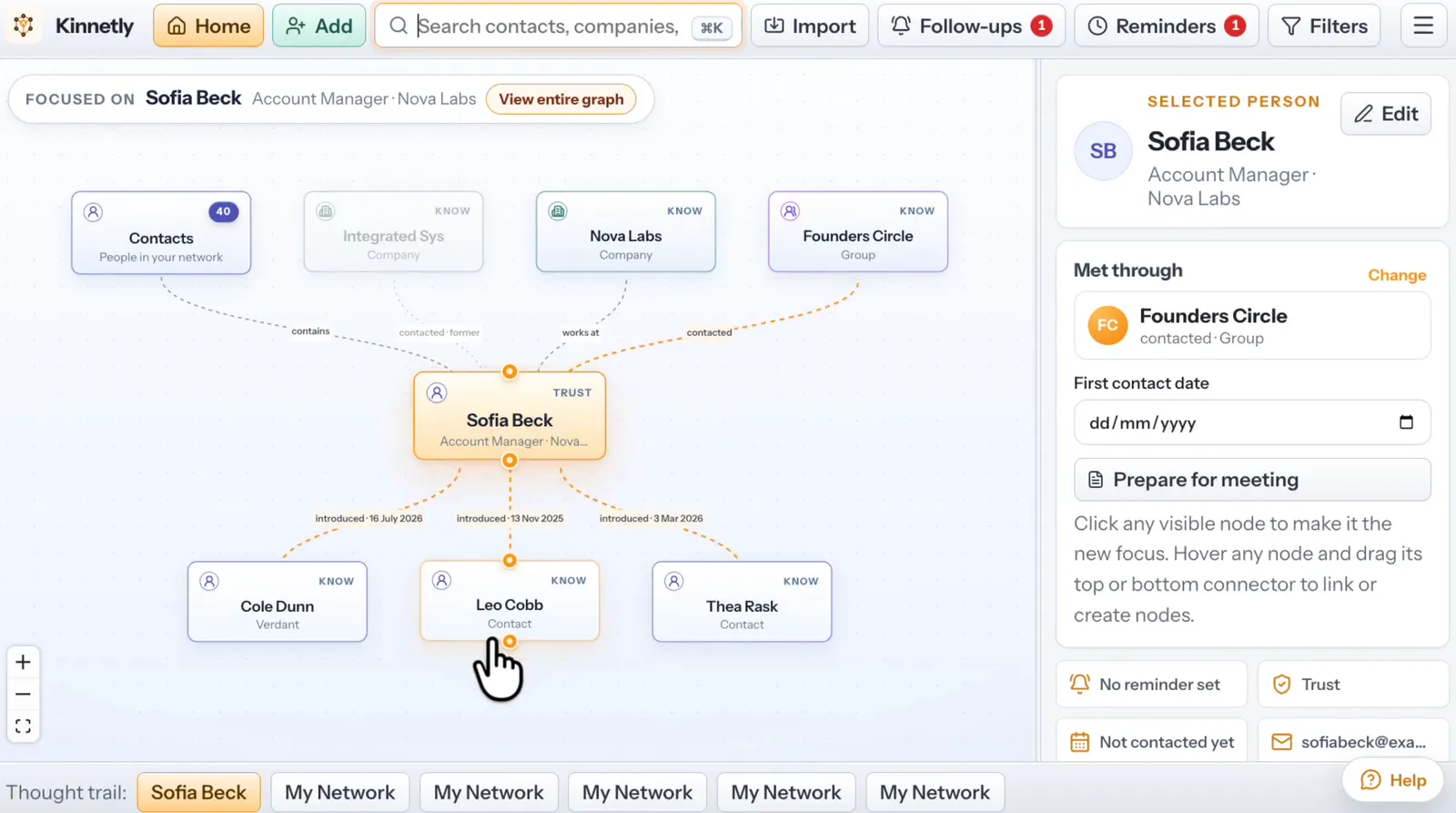
Kinnetly is a personal CRM that presents your network as an interactive visual map. Designed to help you track professional and personal relationships, it lets you map people, companies, groups, events and introductions in your network. The tool focuses on keeping private context about relationships, tracing introductions and setting deliberate follow-ups.
Unlike traditional CRMs that organise contacts in lists, Kinnetly's visual approach aims to show how connections relate to each other, making it easier to spot opportunities and gaps in your network.
Who is Kinnetly for?
Kinnetly suits professionals who want to systematically maintain and grow their professional network. This includes consultants, freelancers, salespeople, recruiters and business owners who rely on relationships for opportunities.
It may also appeal to individuals who want a more organised way to track personal relationships beyond basic contact lists. The visual mapping and introduction tracking could help those who frequently connect people in their network.
Key features of Kinnetly
Kinnetly offers a range of features designed for personal relationship management:
Visual network mapping
- Interactive relationship map showing how contacts connect
- Connection paths to trace how people are linked through others
- Ability to track past companies and groups for context
Contact management
- Standard contacts list alongside the visual map
- Business card scanning to quickly add new contacts
- Duplicate merging to keep your network clean
- CSV and vCard import/export for transferring contacts
- Tags for categorising contacts
Relationship tracking
- Relationship strength indicators
- Introduction tracking to note who connected whom
- Ideal referrals to identify who could make valuable introductions
Reminders and follow-ups
- Birthday reminders
- Custom follow-up reminders
- General reminders for tasks related to contacts
Productivity tools
- Quick capture to rapidly add notes or contacts
- Dictation for hands-free note taking
- Meeting briefings to prepare for interactions
- Recording summaries for capturing key points
- Activity log to track past interactions
Data management
- Archiving for inactive contacts
- Backup and restore functionality
- Dormant contacts identification
Security
- Two-factor authentication for account security
Accessibility
- Web-based interface works on any device
- Command palette for quick navigation
- Search functionality to find contacts fast
Pricing and plans
Kinnetly offers a free plan and paid subscriptions starting at $9.95 per user per month. The free plan provides basic functionality for users who want to try the visual CRM approach before committing to a paid tier.
Platforms and integrations
Kinnetly is currently available as a web application, accessible from any device with a browser. The vendor doesn't mention specific integrations with other tools in the published information.
What to check before choosing Kinnetly
Consider these factors when evaluating Kinnetly:
- Web-only access: As a web application, it requires an internet connection to use. If you need offline access or native mobile apps, this may be a limitation.
- Visual approach: The relationship mapping is central to Kinnetly's value. If you prefer traditional list-based contact management, alternatives might suit you better.
- Personal focus: While it has CRM features, Kinnetly is designed for personal relationship management rather than team sales pipelines.
How Kinnetly compares to alternatives
Kinnetly occupies a niche between full-featured business CRMs and simple contact managers. It's more structured than basic contact apps but less sales-focused than traditional CRM systems.
For visual relationship mapping, Relaticle offers a similar approach with additional team collaboration features. Less Annoying CRM provides a simpler, text-based alternative focused on sales teams. Attio combines CRM functionality with more advanced automation for growing businesses. Capsule CRM offers a middle ground with both contact management and sales pipeline features.
See our comparison tables for a detailed feature-by-feature look at how Kinnetly stacks up against these alternatives.
Who should consider Kinnetly?
Kinnetly works best for individuals who:
- Want a visual representation of their professional network
- Regularly make introductions between contacts
- Need systematic follow-up reminders
- Prefer a dedicated tool over manual contact tracking
- Value relationship context beyond basic contact details
It's less suited for teams needing shared sales pipelines or businesses requiring complex CRM automation. For those needs, consider exploring other CRM options on AppFinder.
The free plan makes it easy to try Kinnetly's approach to visual relationship management before committing to a paid subscription. If the idea of mapping your network appeals to you, it's worth testing how the visual interface works with your existing contacts and workflow.
AppFinder data
Generated from the listings and accepted facts on AppFinder, not written by hand. "Not listed" means we have no confirmed value yet.
Kinnetly key facts
| Fact | Value |
|---|---|
| Pricing | Free plan + paid |
| Free plan | Yes |
| Starting price | $9.95 per user / month |
| Platforms | Web |
| Listed features | 29 |
| Listed integrations | 0 |
| Platforms | Web |
More on AppFinder
Share this article